AI
Calling the model is easy. Shipping its output is hard.
AI content that has to pass the rules first
In Podinfly, AI output never goes straight to Etsy. It passes a rule engine, only the failing field is regenerated, and what still fails goes to a person.
- Author
- Samet Kapucuoğlu
- Published
- min read
- 5 min read
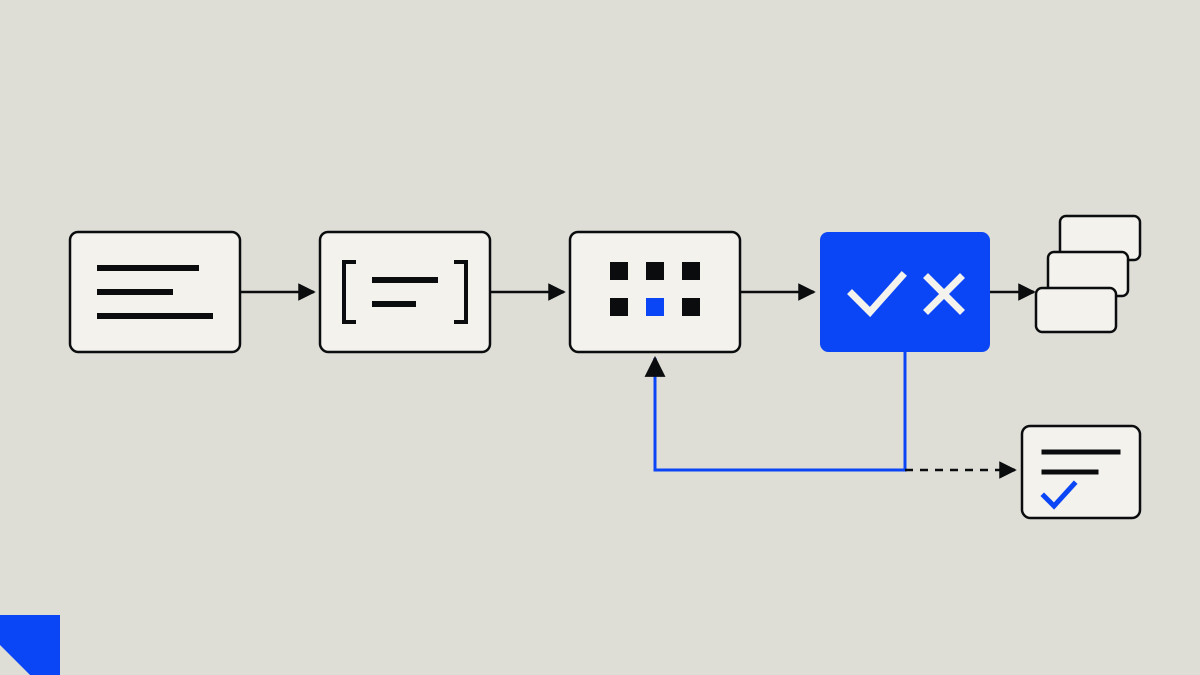
A language model writes a fluent Etsy title in seconds. But Etsy will not save a title over 140 characters, and a listing that arrives with 12 tags instead of 13 leaves a tag slot empty. In Podinfly we never publish what the model writes as it comes: it goes through a rule engine first, only the field that breaks a rule is regenerated, and whatever still fails is shown to a person.
This post walks through how that pipeline is built, which decisions we made and why, and what it looks like in code.
What goes into an Etsy listing
Selling on Etsy does not end at uploading an image and pressing publish. Every product needs its own package: title, description, tags, category, variants, price, attributes and images that sell. Each of those fields has rules.
Etsy's Help Center sets the limits: a title can be up to 140 characters; a listing takes up to 13 tags, and each tag is at most 20 characters. Tags use letters, numbers and spaces; apostrophes and hyphens are allowed inside words, but a tag cannot start with them.
Podinfly applies its own product rule inside those limits: a title between 60 and 110 characters, and exactly 13 tags. Etsy's number is a ceiling, and every empty tag slot is search surface left unused. So fewer than 13 counts as a violation too.
The rules are not only about length. In a listing for a physical product, words like "digital", "printable" or "svg" mislead the buyer; they belong to the digital download category. Another company's brand cannot go into the title. Spending title space on a brand name nobody searches for is waste.
Why the model alone is not enough
Writing "exactly 13 tags, each at most 20 characters" in the prompt does not guarantee the output will follow it. Language models are bad at counting characters. They do not see words, they produce text in fragments. A banned word comes back easily because it is common in training data. The same word turns up in the title and in three tags.
What these failures have in common is that a machine can check every one of them exactly. "Is this title good?" is up for debate; "is this title over 110 characters?" is not. We write the second kind of rule in code.
The pipeline in four steps
- Templated prompt. Every generation uses the same template. It carries the product data, the marketplace context and the schema of the expected output. The model returns an object whose fields are fixed in advance.
- Rule engine. The output is checked field by field: length, tag count, tag characters, banned words, repetition. Every violation says which field failed and why.
- Bounded regeneration. If there is a violation, only that field is regenerated. The violation itself goes back into the prompt: "tag 7 is 23 characters; the limit is 20". The number of attempts is capped.
- Confidence gate. When the attempts run out, content that still fails does not enter the publishing queue. It goes to a person instead.
What the rule engine looks like in code
The code below is a simplified example of how the rules are held. The real rule set in Podinfly is longer and changes by product group; the structure is the same.
type Listing = { title: string; tags: string[]; description: string };
type Violation = { field: keyof Listing; rule: string; detail: string };

const BANNED = ["digital", "printable", "svg", "mockup"];
const TAG_CHARS = /^[\p{L}\p{N}][\p{L}\p{N} '-]*$/u;

export function validate(listing: Listing): Violation[] {
  const out: Violation[] = [];
  const { title, tags } = listing;

  if (title.length < 60 || title.length > 110) {
    out.push({ field: "title", rule: "length", detail: `${title.length} chars, needs 60-110` });
  }

  if (tags.length !== 13) {
    out.push({ field: "tags", rule: "count", detail: `${tags.length} tags, needs exactly 13` });
  }

  tags.forEach((tag, i) => {
    if (tag.length > 20) out.push({ field: "tags", rule: "tag-length", detail: `tag ${i + 1}: ${tag.length} chars` });
    if (!TAG_CHARS.test(tag)) out.push({ field: "tags", rule: "tag-chars", detail: `tag ${i + 1}: invalid character` });
  });

  const text = `${title} ${tags.join(" ")}`.toLowerCase();
  for (const word of BANNED) {
    if (text.includes(word)) out.push({ field: "title", rule: "banned-word", detail: word });
  }

  const seen = new Set<string>();
  for (const tag of tags.map((t) => t.toLowerCase())) {
    if (seen.has(tag)) out.push({ field: "tags", rule: "duplicate", detail: tag });
    seen.add(tag);
  }

  return out;
}
Two decisions matter here. First, the engine does not return true or false; it returns a list of violations. You cannot regenerate just the failing field without knowing which field failed and why. Second, the rules live as data. When a new product group arrives, the engine stays the same and the rule list changes.
Regenerate only the field that failed
On the first attempt the title may be fine while one tag is too long. Regenerating the whole listing puts the good title at risk: the new one may come out too short. So regeneration works at field level.
async function generateListing(product: Product): Promise<Result> {
  let draft = await model.generate(promptFor(product));

  for (let attempt = 0; attempt < MAX_ATTEMPTS; attempt++) {
    const violations = validate(draft);
    if (violations.length === 0) return { status: "ready", listing: draft };

    const fields = [...new Set(violations.map((v) => v.field))];
    const patch = await model.regenerate(product, draft, fields, violations);
    draft = { ...draft, ...patch };
  }

  const remaining = validate(draft);
  if (remaining.length === 0) return { status: "ready", listing: draft };
  return { status: "needs-review", listing: draft, violations: remaining };
}
There are two reasons to cap the attempts. The first is cost: every call has a price, and an unbounded loop quietly eats the budget. The second is signal: a field that does not settle after a few attempts may point at the product data rather than the model. A missing attribute, an undefined variant, a design name that means nothing. Showing that field to a person costs less than one more attempt.
The confidence gate
Content that breaks a rule does not get published. But if users cannot see why a listing is waiting, they assume the system is broken.
This is where returning a list of violations pays off a second time. Waiting content goes to a person together with the reason it is waiting: which field, which rule, by how much. Corrected content runs through the same engine again.
Credits are charged once the output is saved
The validation pipeline has a money side too. Generation in Podinfly spends credits, and users should only pay for output they can use. So the order is:
- Before generating, check that the balance is enough.
- Generate, validate and save the output.
- Only then spend the credit, with an idempotency key.
- If spending fails, delete the output that was generated.
Credit movements go into an append-only ledger, and the balance is derived from it. If the same request arrives twice, for example because the user clicked twice, the second write hits a unique key in the database and never happens. "My credits are gone but there is no listing" and "I paid twice for the same job" cannot happen by construction.
What we took away
When a rule lives in the prompt, you are asking the model nicely; when it lives in code, you are checking the result. We do both, and the code has the final say. Error reports stay at field level too: which field broke which rule, and by how much.
Content the model cannot get right goes to a person. And money follows output: users only spend credits on results they can use.
This pipeline runs in Podinfly's listing flow today. We describe the rest of the product, with real screens, on the Podinfly case study page.
Author
Samet Kapucuoğlu
Co-founder, BESK. Software architecture and multi-tenant SaaS infrastructure.
Project behind this post: Podinfly